Progressive Web App: How It Works, Its Limits
· DigifyNow
A progressive web app is a website that the browser installs like an app. It needs three things: delivery over HTTPS, a web app manifest with name, icons, start URL and display mode, and a service worker that intercepts requests and caches files. It then launches from the home screen, runs in its own window and partly works offline. The limits come from the browser: device access, push and installation depend on what Safari, Chrome or Firefox support.
What is a progressive web app?
A progressive web app (PWA) is a website you can install on your device like an app. It gets an icon on the home screen, opens without an address bar and shows cached content even when there is no connection. According to Mozilla's MDN Web Docs (as of November 2026), it takes three building blocks: HTTPS, a web app manifest and a service worker.
Under the hood, a PWA is built from HTML, CSS and JavaScript, just like any web application. It doesn't need an app store; it is installed through the browser. "Progressive" means the application runs as a normal website in every browser and only uses additional app features where the browser actually offers them. Here is an example from our project work that you won't find in the documentation: a trades business has an order overview built for its field technicians. In the office, staff open it in the browser on a PC. On the company phone, the technician installs it once through the browser menu and from then on launches it like any other app. The day's jobs are still visible in a dead zone because they were cached beforehand. New status updates, on the other hand, wait until the connection is back. That isn't a bug; that's how the approach works.

How does a PWA work technically?
A website becomes an installable PWA when the following building blocks come together. If HTTPS or the manifest is missing, Chrome won't offer installation. Without a service worker, the app may still be installable depending on the browser, but it stays empty offline. The details follow the MDN Web Docs and Microsoft Learn's PWA documentation (as of November 2026).
- HTTPS: Service workers only run over encrypted connections, which MDN calls a "secure context". The only exception is localhost on the development machine.
- Web app manifest: a JSON file referenced in the HTML head. Among other things, it contains name and short_name, the icons, the start_url and the display mode. The value standalone opens the app in its own window without the browser bar, fullscreen without any system bars, minimal-ui with a few controls, and browser like a normal tab.
- Service worker: a JavaScript file that the page registers via navigator.serviceWorker.register. It runs separately from the page and intercepts its network requests. What it controls is defined by its scope, which by default is the folder the file sits in.
- Caching strategy: Using the Cache API, the service worker decides where a file comes from. With "cache first" it comes from storage, with "network first" from the server with storage as the fallback, and with "stale while revalidate" the stored version is shown first and refreshed in the background.
- Optional push: Notifications run through the Push API and the Notifications API. The server registers with the browser's push service using VAPID keys, and the user has to give permission.
Most problems in production show up during updates. A new version of the service worker does get installed, but it stays in the "waiting" state until every window running the old version is closed. MDN describes this in its article on the service worker lifecycle. Without deliberate update logic (skipWaiting plus a notice to the user), people end up seeing the old version for days, especially if they never fully close the installed app, which is typical for technicians on company phones.
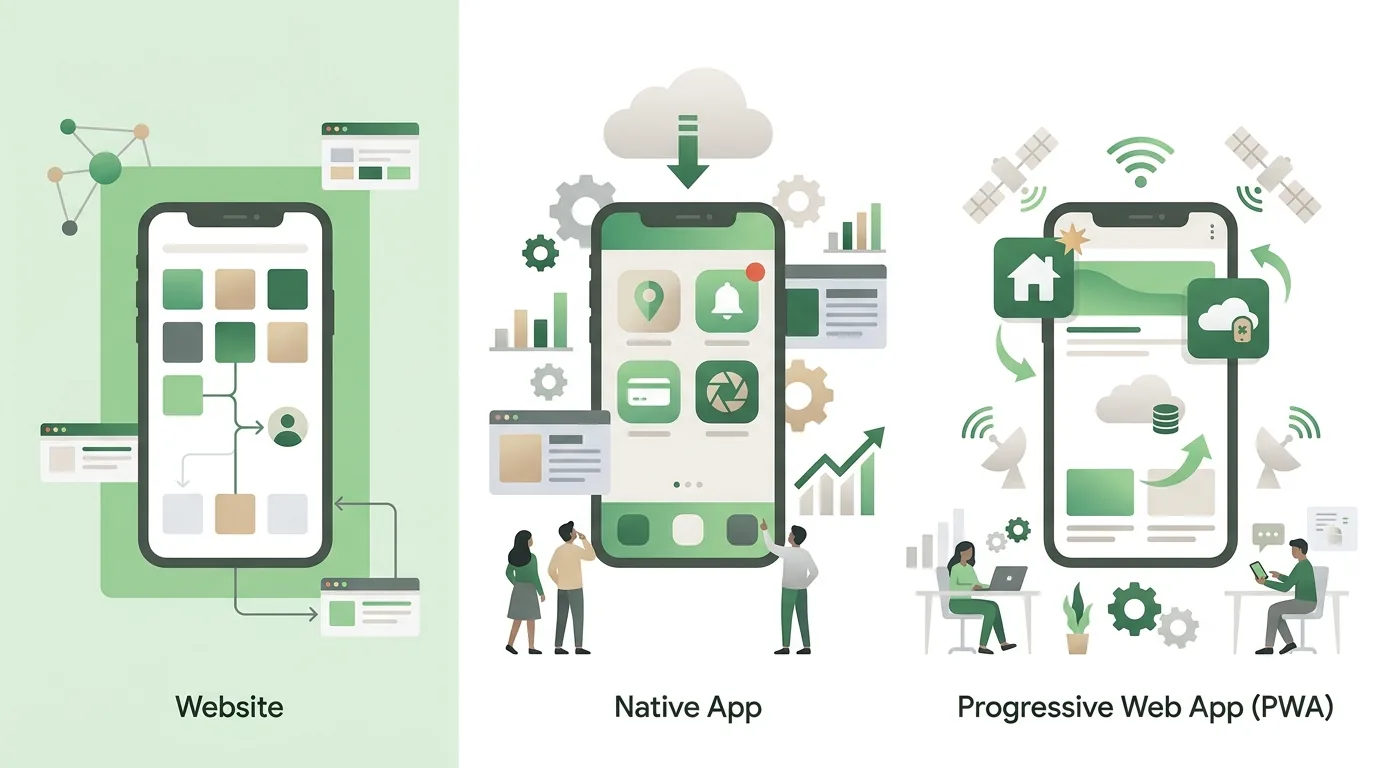
PWA vs native app vs website: what's the difference?
All three approaches can sit on the same server backend. They differ in where they run, how they get onto the device and which hardware they're allowed to access. Cross-platform frameworks like Flutter or React Native produce native apps, so they belong in the middle column. How those two differ is covered in our Flutter vs React Native comparison for small and mid-sized businesses.
| Feature | Progressive web app | Native app (incl. Flutter, React Native) | Responsive website |
|---|---|---|---|
| Installation | Through the browser, no store needed | Through the App Store and Google Play | None, opened via URL |
| Offline | Whatever the service worker caches | Fully possible, local database | No |
| Push notifications | Via Web Push; on iOS only after Add to Home Screen | Yes, via Apple's and Google's push services | No |
| Device access | Camera, location; Bluetooth and NFC only in some browsers | Full access through the platform APIs | Same as PWA, without installation |
| Updates | Immediately on the next load from the server | Through store review and an update by the user | Immediately |
| Codebase | One for all devices | One per platform, or a framework with platform-specific parts | One |
Whether a PWA or a native app is the right path is best decided early in the project. We've put together the questions that help in How to develop an app: process, platform, choosing a partner.
When is a PWA not enough?
A PWA can only do what the browser allows. That matters most on iPhones, because browsers there almost all run on Safari's WebKit engine. These are the limits we run into again and again in practice. The browser support details come from the MDN Web Docs compatibility tables (as of November 2026):
- No install prompt on iOS: According to MDN, the beforeinstallprompt event only exists in Chromium browsers like Chrome and Edge; it is not a web standard. On an iPhone, users have to go through "Share" and "Add to Home Screen" themselves, and anyone who doesn't know that route won't install anything. That's why we plan a short illustrated guide right inside the app in our projects.
- Hardware: Web Bluetooth and Web NFC are missing in Safari and Firefox. So if the app needs to drive a Bluetooth scanner or a machine, a PWA is usually ruled out.
- Storage: The browser may delete cached data when space runs low or a site hasn't been used for a long time. Data captured offline that hasn't been synced yet is then lost. The Storage API offers navigator.storage.persist to request persistent storage, but whether it's granted is up to the browser.
- Background work: The service worker only spins up briefly when an event arrives. Continuous location tracking or regular background syncing doesn't work reliably.
- Store presence: For Google Play, a PWA can be packaged as a Trusted Web Activity. The domain then has to be verified with an assetlinks.json file. In Apple's App Store, a pure web wrapper often gets rejected, because Apple's review guidelines require minimum functionality beyond a website.
If the app has to be in the stores, the article on having an app built and publishing it in the App Store explains how to get it there.
What are some examples of web apps?
Most people use web apps every day, even if they don't call them that. Google Docs, Outlook on the web and Figma are web applications. They run entirely in the browser, store their data on the server and can, in some cases, be installed as an app in Chrome or Edge. In mid-sized companies, they tend to be internal tools: a customer portal with login where clients pull up orders and invoices, a mobile time tracking tool, an inventory system you update by scanning with the camera, or a back office with a CRM. DigifyNow built one of those for Mundo Marketing. A PWA pays off for tools like these when they're used on many devices that can't be managed centrally and when no special hardware access is needed. If nobody needs to use the application on the road without a connection and nobody has missed a home screen icon, a well-built web app without a service worker is often enough. That saves you from maintaining caching logic.
How much does a progressive web app cost?
There's no flat price for a PWA, because the PWA technology itself is only a small part of the effort. The manifest and a simple service worker are quick to build. What gets expensive is everything behind them. A reliable figure only comes out of a written scope with acceptance criteria. The article App development cost: what drives the price explains the cost drivers in detail.
- Scope: number of screens, roles and permissions, and how much logic sits behind them.
- Offline capability: read-only is manageable. Writing offline and syncing later needs a way to resolve conflicts when two people change the same record.
- Integrations: connections to ERP, inventory management, CRM or accounting, plus the question of whether those systems have a documented API.
- Data: migrating legacy data, meaning cleanup, mapping and a test import.
- Operations: hosting, dependency updates, monitoring and testing on new browser versions, especially on iOS.
PWA and app development in the Westerwald
DigifyNow GmbH is based in Unnau in the Westerwald region of Germany, at Grenzweg 9a. The team of Jesper Schmidt, Christian Schiebl and Miles Pandel builds web apps, PWAs and native apps for small and mid-sized businesses. The focus is on the Westerwald, Koblenz and the Siegerland, but projects come from all over Germany. Most start with an MVP built in 4 to 8 weeks, followed by ongoing operation. What applies to a specific project only becomes clear in the assessment. The party game app Festino, a product of DigifyNow, was deliberately released as a native app rather than a PWA, because people search for game apps in the stores.
- App development in the Westerwald: For businesses in the region, this means short trips for on-site meetings, for example to look at a workflow in the workshop or warehouse before deciding between a PWA and a native app.
- App developers in the Westerwald: Ask a developer first whether they build for both web and native platforms. Anyone who only offers one technology will recommend that one. At DigifyNow, both are built by the same team.
- App development agency in the Westerwald: Make sure the source code, the domain and the store accounts are registered to your company. Switching providers later depends on exactly that.
- Web app development in the Westerwald: A web app or PWA is the obvious route when employees work with the same data on a PC and on their phones.
- Mobile app agency in the Westerwald: If an app has to be in the store, use Bluetooth or work reliably in the background, it gets built natively or with a cross-platform framework. A PWA isn't an option then.
More locations and contacts in the region are on the page about our service areas in the Westerwald, with implementation details on the pages for app development in the Westerwald and web app development in the Westerwald.
When outside help makes sense
For an existing website that just needs a manifest and a simple cache, your own web team is often enough. Outside help makes sense when the application has to capture data offline and sync it later, when it's being connected to an ERP or inventory system, or when it's still open whether it should be a PWA or a native app. Come prepared with who will use the application on which devices, whether there's a reliable connection where they work, which systems need to be integrated and whether the app has to be in the store. In the free assessment of your project, DigifyNow looks at these points and tells you which path fits, and also when none of them is worth it.
Frequently asked questions
What is a progressive web app?
A progressive web app is a web application that the browser can install. Technically, it's a website with HTTPS, a web app manifest for name, icons and display mode, and a service worker for caching (MDN Web Docs, as of November 2026). Unlike a regular website, it launches from the home screen, opens in its own window and shows cached content without a connection.
How does a PWA work?
The page registers a service worker, a script that runs separately from the page and intercepts every network request. Using the Cache API, it decides whether a file comes from storage or from the server, for example following "cache first" or "network first". The manifest gives the operating system the name, icon, start URL and display mode, such as standalone for its own window.
What's the difference between a PWA and a native app?
A PWA runs in the browser, is installed without a store and gets updates on the next load from the server. A native app is distributed through the App Store or Google Play, goes through review there and has full access to Bluetooth, NFC and background processes. A PWA needs one codebase for all devices, but it can only do what each browser allows.
Can a PWA send push notifications on an iPhone?
Yes, but only under one condition. On iOS, Web Push only works once the user has added the web app via "Add to Home Screen" and accepts the permission request. There is no push in a regular Safari tab. On Android and desktop, by contrast, permission in the browser is enough; installation isn't required there.
Why does my PWA still show the old version after an update?
The new version of the service worker gets installed but waits in the "waiting" state until every window running the old version is closed. Until then, the old service worker keeps serving the cached files. The fix is update logic with skipWaiting that tells the user a new version is ready and reloads the page once they confirm.